Use CloudTally
Check what drives your month-end forecast
Read how your forecast adds up, check daily rates and recent changes, and understand monthly caps, the range and confidence.
Last updated: 2026-10-17
On this page
Use the forecast explanation to check your expected month-end cost before deciding whether a change needs investigation. It separates recorded spend from estimated spend and shows how monthly caps reduce the total.
Read your forecast
- Open Dashboard. Find Projected month-end, beside This month. The amount estimates your total cost for the current calendar month, including recorded spend.
- Select the info control beside it, labelled Why this forecast?. It opens Forecast explanation. Selecting the card itself opens Cost Explorer instead.
- Read Forecast summary. Start with the total, Likely between, and High confidence, Medium confidence or Low confidence. The bar separates Spent so far: from Still to come:. Amounts use your organisation's display currency and VAT choice.
- Read How this adds up. Follow the recorded spend, today's estimate, projected days and any cap deduction down to Projected total.
- Read What changed. It explains a continuing rise or a change in running resources, then any excluded spike days and expected repeat spikes. Recent connection events impacting forecast appears here when there are project events to show.
- Compare Daily rate by category. Each category has its own Trend, Notes and Daily rate. Total daily rate adds the rates together. A category with no rate and nothing left to project is left out.
- Close the dialog.
- Select the Projected month-end card to inspect the forecast and resources in Cost Explorer.
Leave Technical details closed unless you need the confidence score or model values for troubleshooting.
How the numbers add up
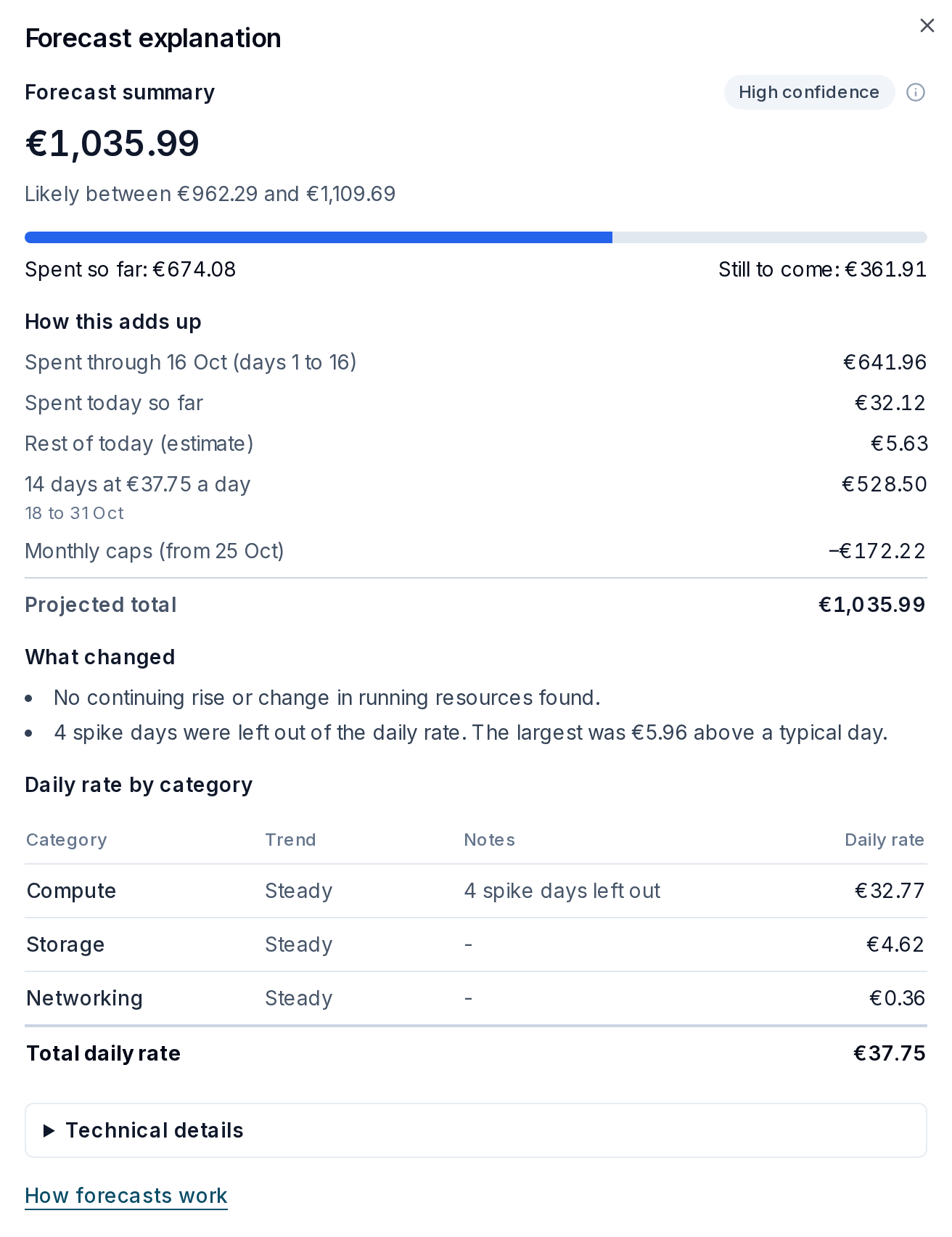
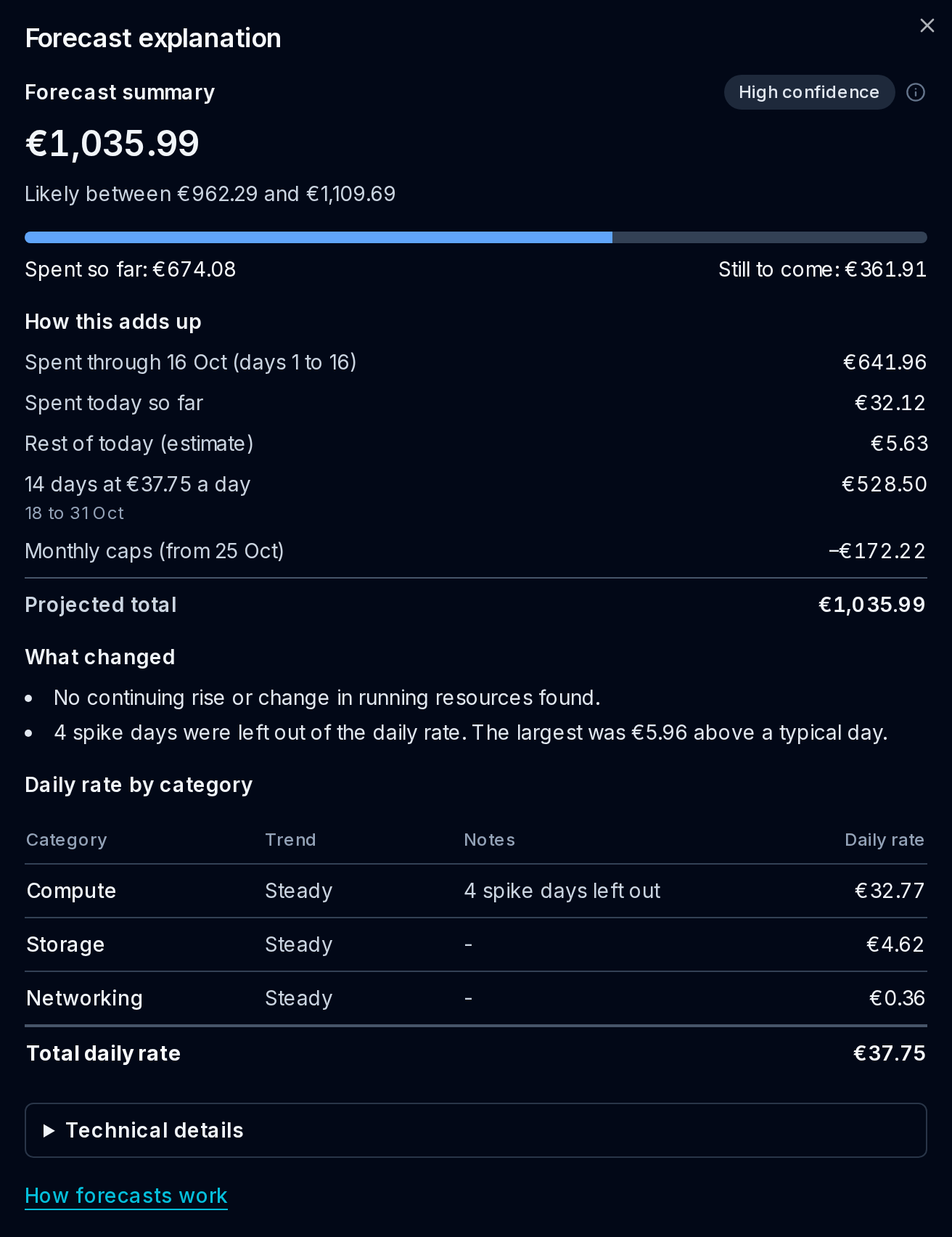
The screenshot uses synthetic demo data for Musterfirma GmbH on 17 October. Its rows reconcile as follows:
| Row in How this adds up | Amount | Meaning |
|---|---|---|
| Spent through 16 Oct (days 1 to 16) | €641.96 | Recorded spend for completed days. |
| Spent today so far | €32.12 | Today's recorded spend. |
| Rest of today (estimate) | €5.63 | Today's estimated remaining cost, before caps. |
| 14 days at €37.75 a day | €528.50 | 14 × €37.75 for 18 to 31 October, before caps. |
| Monthly caps (from 25 Oct) | −€172.22 | Reduction from applying each resource's monthly cap. |
| Projected total | €1,035.99 | All the rows above added together. |
Today is part spent: €32.12 is already recorded, leaving €5.63 of the €37.75 daily estimate. The 14 full days start tomorrow. Counting today as another full day would count some cost twice.
Recorded spend is €641.96 + €32.12 = €674.08. Estimated spend before caps is €5.63 + €528.50 = €534.13. Subtract caps once: €534.13 − €172.22 = €361.91 Still to come:. Add recorded spend: €674.08 + €361.91 = €1,035.99.
Expected repeat spikes adds recurring extras when expected. It covers the projected full days; today's remaining repeat spike is included in Rest of today (estimate). When the forecast adjusts for weekends, full days are split into weekday and weekend rows. Rows with no days left are omitted. The dates under the last day-count row list all projected days, including an earlier day if its cost has not arrived. When today has no recorded spend, it counts as a full projected day instead.
How the forecast is built
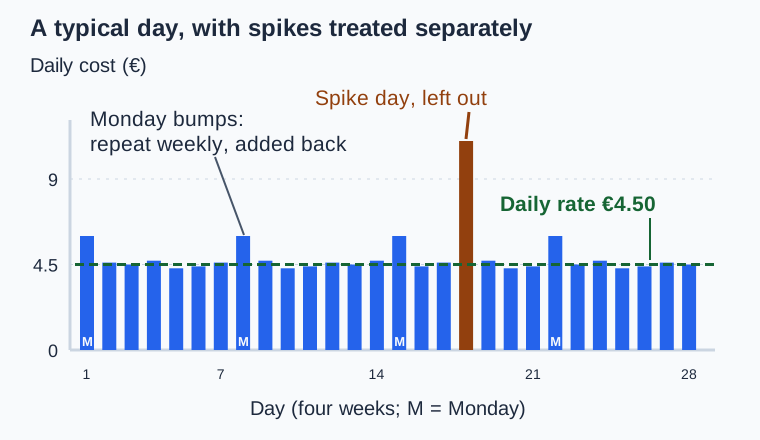
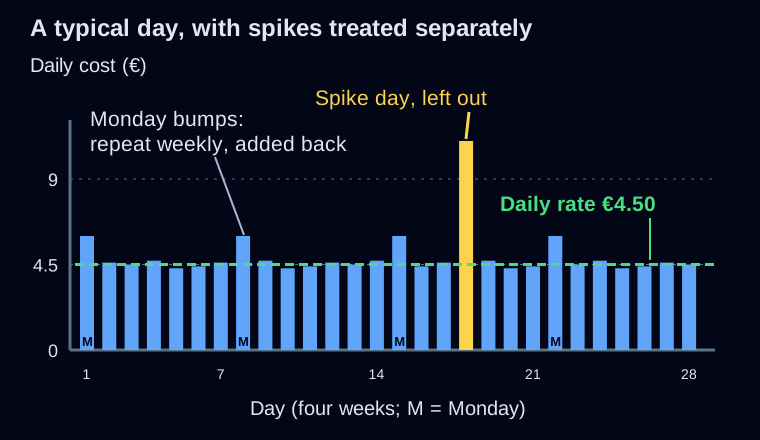
The four diagrams use illustrative euro amounts, rather than the demo's current figures.
Daily rate and categories
CloudTally normally takes the middle value of daily costs from up to 14 recent days, leaving out spike days. A detected rise can shorten that window. With little history, it can look further back for enough samples. The usual rate uses billed costs; rise detection and resource-change checks use costs before caps. A confirmed change replaces the usual rate. Category rates are rounded to cents before projecting.
- Compute covers cloud servers.
- Storage covers volumes, snapshots and backups.
- Networking covers load balancers, primary and floating IPs, private networks and traffic.
The demo's €32.77 + €4.62 + €0.36 gives its €37.75 Total daily rate. CloudTally compares weekday and weekend costs over eight weeks. When their averages differ by more than 10% of the overall daily average, it adjusts the projection. The adjusted rates appear below the category total and in the calculation rows.
Upward anomalies lasting one to three consecutive days can be excluded as temporary spikes. Four days at a higher level are not automatically a confirmed rise. A spike must appear on the same weekday at least three times in the last 30 days with cost data. It then adds an expected extra to matching projected days, scaled by the share of that weekday's days with cost data in the window that had a spike. The demo excludes four spike days; its largest was €5.96 above a typical day, not €5.96 in total.
Rises and changes in running resources
CloudTally checks the last three weeks for a continuing rise and can look further back to find its start. Spend must stay more than 15% above the preceding week's rate on most of the following five days. The jump must stand out from normal variation and remain higher now. What changed names the category, date and rates when a start can be identified reliably.
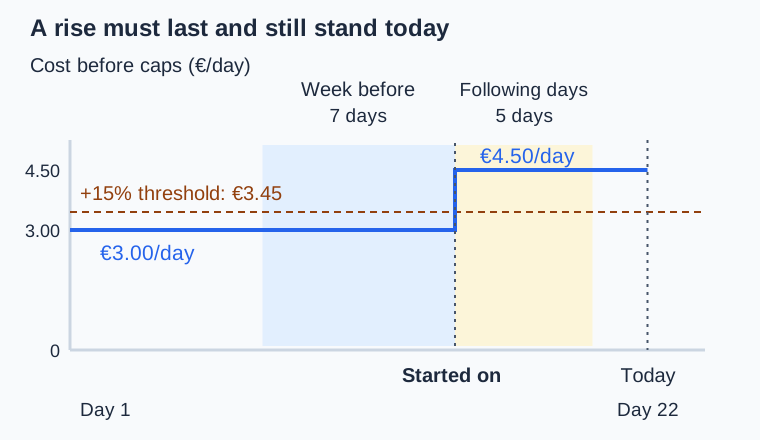
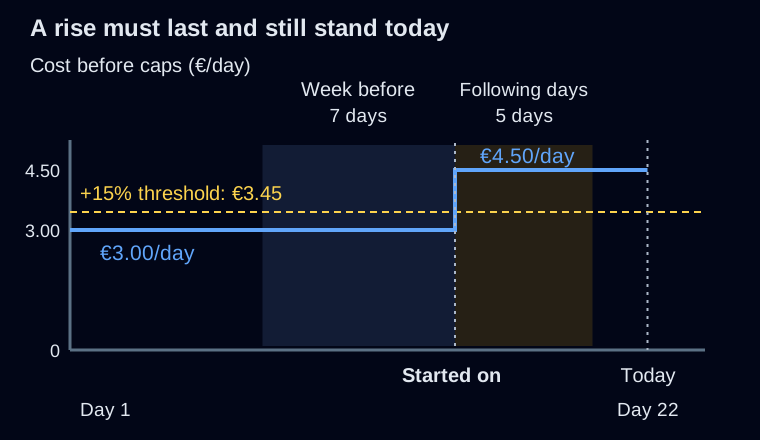
A separate check compares recent hourly resource costs with the daily rate, both before caps. A difference above 15% in the same direction on each of the last three completed days with cost data can switch the forecast to the current rate. Missing days are skipped. Categories whose daily rate before caps is below 0.10 in your display currency skip this check. This is how deleted servers leave the forecast after about three full days; smaller changes work through the usual rate estimate.
In the category table, Steady means no continuing rise or confirmed current-rate change was found. Rising marks a continuing rise; Current rate marks a confirmed switch. Not enough history means there is too little data to identify a trend. Notes shows each category's excluded spike-day count.
Monthly caps
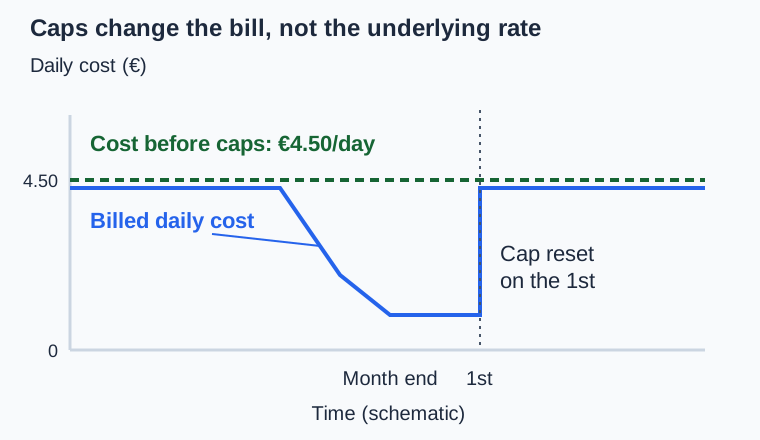
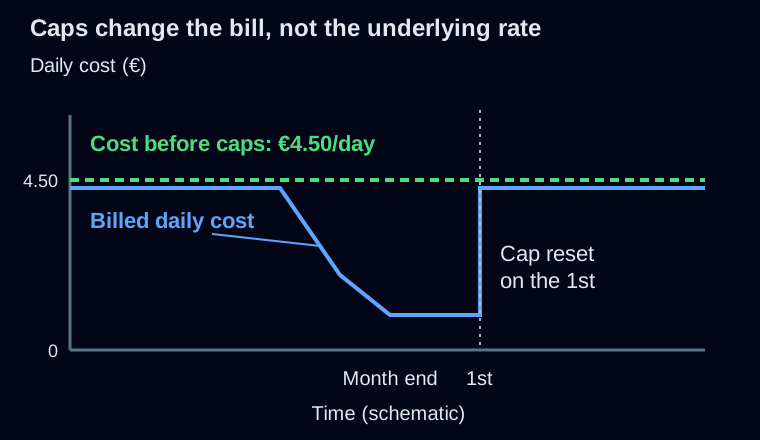
CloudTally treats only cloud servers, load balancers and primary IPs as capped. Each resource keeps its own remaining allowance: its monthly price minus its recorded spend, never below zero. Projected cost uses that allowance day by day. A resource already at its cap adds nothing further.
When caps start reducing cost depends on each resource's price and start date. The date in Monthly caps (from 25 Oct) is the earliest projected reduction in this demo, not a fixed day each month. The row is absent when caps make no reduction. Rises are detected before caps so a monthly reset does not itself look like growth.
Range and confidence
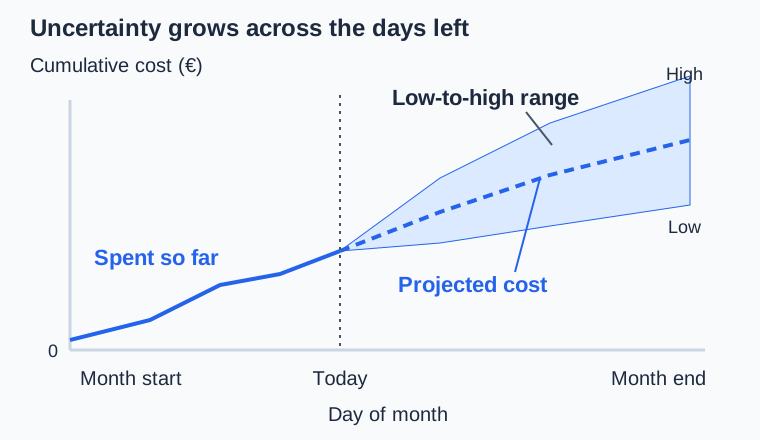
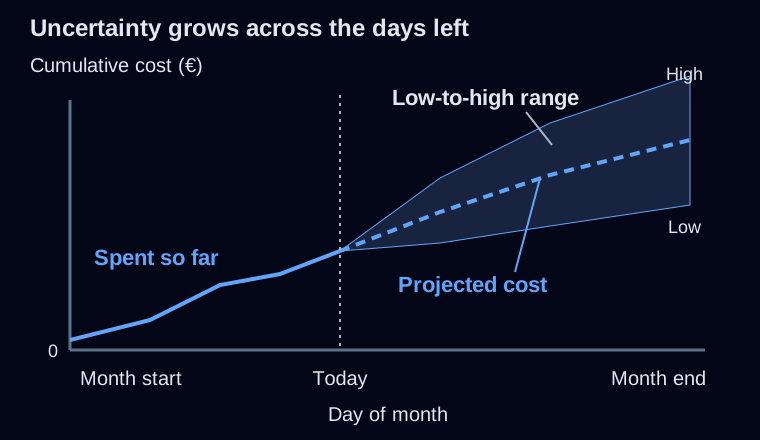
The range grows with daily variation and the number of days left. Its low end never falls below recorded spend. It can therefore extend different distances above and below the total.
Confidence is separate. Consistent spend, a confirmed change in running resources and more of the month being known can raise it. Variable spend, a rise within the last seven days that running resources do not confirm, and more than five of the last 30 days without cost data can lower it. Categories with no daily cost can also lower confidence.
High confidence means a score of at least 75%; Medium confidence starts at 50%; below that is Low confidence. The percentage on Projected month-end and the score in Technical details are the same value. It is not the chance that the bill will land inside the range. Changing confidence alone does not widen the range.
Troubleshooting
- Could not load connection events: select Retry to load recent project changes again.
- No calculation rows: an older forecast can lack How this adds up. Use the summary and category rates until an updated forecast is available.
- Deleted servers still affect the forecast: check project sync. Missing cost data can delay confirmation of a lower rate.
- A wide range early in the month: check again as recorded spend replaces estimates.